Liga CTF 2026: Unpackme Series
Description
Packing is a technique used by malware to obfuscate its functionalities. Malware packers ‘pack’ the main malicious binary to make static analysis much harder. The malware ‘unpacks’ during runtime.
Your task across this series: identify the packer used for each binary, unpack it, and find the flag.
What is a Packer?
A packer compresses or encrypts an executable and wraps it with a small stub. When the packed binary runs, the stub decompresses the original code in memory and executes it. This makes static analysis harder because tools like strings and Ghidra only see the packed version — not the real code.
Common packers you’ll encounter in CTFs and malware:
| Packer | Signature | Notes |
|---|---|---|
| UPX | UPX! magic bytes | Most common, easy to detect |
| ASPack | .aspack PE section | Common in Windows malware |
| MPRESS | .MPRESS1 section | Less common |
Unpackme0 - Basic UPX
Running the Binary
1
2
chmod +x unpackme0
./unpackme0
 the binary tells us exactly what to do — unpack it and submit the md5 hash
Identifying the Packer
1
strings unpackme0
Immediately reveals:
1
2
3
4
UPX!
$Info: This file is packed with the UPX executable packer http://upx.sf.net $
$Id: UPX 5.11 Copyright (C) 1996-2026 the UPX Team. All Rights Reserved. $
UPX!
Packer: UPX 5.11, announces itself no reversing needed.
Unpacking
1
2
sudo apt install upx
upx -d unpackme0 -o unpackme0_unpacked
Flag
1
md5sum unpackme0_unpacked
 md5sum of the unpacked binary, that’s our flag
OWASPKL{1cc6a3b62cac36ab18e0c4685a7f4bdf}
Unpackme1 - UPX with Renamed Magic Bytes
Identifying the Anti-Unpack Trick
1
strings unpackme1
Key findings:
1
2
3
UPX!     ← still present at the start
VQY!     ← suspicious, different magic at the end
$Info: This file is packed with the VQY executable packer
If we try the naive approach:
1
upx -d unpackme1
We get an error — not packed by UPX. That’s the anti-unpacking technique!
The packer is still UPX underneath, but the magic bytes were renamed from UPX! to VQY!. UPX validates its own signature before unpacking, so it rejects the binary.
The Fix - Patch the Magic Bytes Back
Simply rename VQY back to UPX using sed:
1
2
3
cp unpackme1 unpackme1_patched
sed -i 's/VQY/UPX/g' unpackme1_patched
upx -d unpackme1_patched -o unpackme1_unpacked
Flag
1
strings unpackme1_unpacked | grep "OWASPKL"
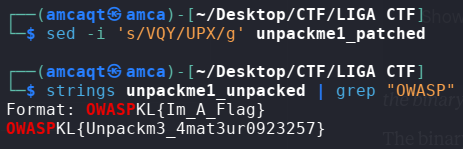 patching VQY back to UPX then grepping for the flag
OWASPKL{Unpackm3_4mat3ur0923257}
Unpackme2 - ASPack (Windows PE)
Identifying the Packer
This time it’s a Windows .exe. Run strings:
1
strings unpackme2.exe
Key findings in the PE sections:
1
2
3
4
5
.aspack    ← packer section name!
.adata     ← aspack data section
VirtualAlloc
VirtualFree
VirtualProtect   ← classic unpacking IAT calls
Packer: ASPack, the .aspack and .adata sections are its dead giveaway signature.
Unpacking
We use unipacker, a universal unpacker that handles ASPack:
1
2
pip install unipacker --break-system-packages
unipacker unpackme2.exe
Flag
1
strings unpacked_unpackme2.exe | grep -i "l33t\|1337\|4\|3\|0"
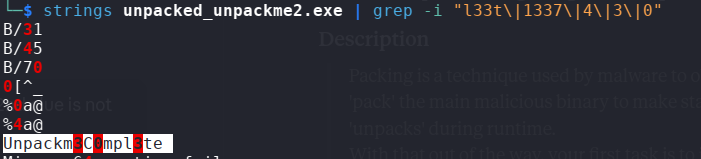 grepping for l33tspeak strings reveals the hidden flag part
Flag format: OWASPKL{<PACKER_NAME>_<l33tspeak_string>}
OWASPKL{ASPACK_Unpackm3C0mpl3te}
Summary
| Challenge | Packer | Trick | Flag |
|---|---|---|---|
| Unpackme0 | UPX | None — basic packing | OWASPKL{1cc6a3b62cac36ab18e0c4685a7f4bdf} |
| Unpackme1 | UPX | Magic bytes renamed VQY→UPX | OWASPKL{Unpackm3_4mat3ur0923257} |
| Unpackme2 | ASPack | PE section identification | OWASPKL{ASPACK_Unpackm3C0mpl3te} |
Lessons Learned
stringsis always your first weapon: packers leak metadata even when they try to hide- UPX magic bytes (
UPX!) appear at start and end, renaming them defeats automated tools but not manual patching - PE section names reveal the packer instantly
.aspack= ASPack,UPX0/UPX1= UPX upx -dhandles standard UPX,unipackerhandles everything else- There are always two ways to solve a challenge, the hard way and the smart way
Happy Hacking
