Liga CTF 2026: Lockbox
Description
I made this little program that locks a secret message inside a binary. I used THREE layers of protection — there’s literally no way to get the message out without the proper unlock code. The only way in is
--unlock, and you’d need my 64-character HMAC key for that. Try to get the message if you think you’re so smart lol— AcekiraSecond
Recon
We’ve given two files:-
1st File = lockbox 2nd File = friend_note.txt
this the content of friend_note.txt
1
2
3
4
5
6
7
8
9
10
11
12
13
14
15
16
hey,

so i've been learning cryptography lately and honestly it's really cool.
i made this little program that locks a secret message inside a binary.

i used THREE layers of protection

there's literally no way to get the message out without the proper unlock code.
the only way in is --unlock, and you'd need my 64-character HMAC key for that.

i'm attaching the binary. try to get the message if you think you're so smart lol
i bet you can't.

– AcekiraSecond

p.s. i even checked with strings and nothing useful showed up. i'm a genius
ALso the binary was given without execute permission, so we fix that first:
1
2
chmod +x lockbox
./lockbox
First thing first - we run strings on the binary file, since its mention on the text file:
1
strings lockbox
Even before opening any tool, strings already leaked everything we need:
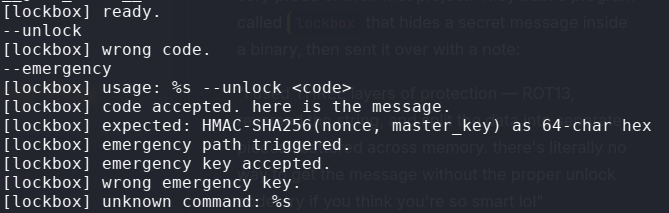 strings output — the binary rats itself out immediately
Two things stand out immediately:
1
2
3
--unlock      ← main path, needs 64-char HMAC hex
--emergency   ← hidden second path the author didnt mention
strcmp        ← direct string comparison (not real HMAC at all!)
The challenge note said “the only way in is --unlock” — but --emergency is sitting right there in the binary. Also, strcmp in the imports means the key validation is a plain string comparison, not real HMAC-SHA256.
The Smell of strcmp
Whenever you see strcmp in the imports of a CTF binary, it almost always means a hardcoded key comparison. This is the biggest tell.
ltrace intercepts library calls at runtime and prints their arguments. When strcmp(your_input, real_key) gets called — both arguments print in plaintext.
Solution — ltrace
Run the binary through ltrace using the --emergency flag with any dummy input:
1
ltrace ./lockbox --emergency owaspctf
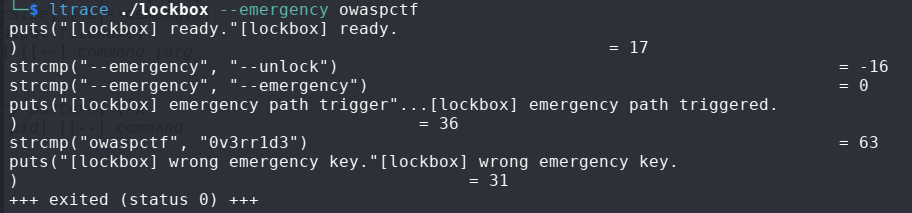 ltrace catching strcmp red-handed — real key printed in plaintext
Peep this line:
1
strcmp("owaspctf", "0v3rr1d3") = 63
The real emergency key is 0v3rr1d3 leaked directly by ltrace. No reversing needed.
Getting the Flag
Use the leaked key:
1
./lockbox --emergency 0v3rr1d3
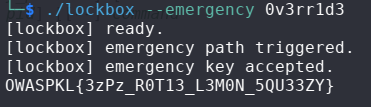 emergency key accepted — flag printed
Flag
OWASPKL{3zPz_R0T13_L3M0N_5QU33ZY}
Lesson Learned
- Always try ALL flags : hidden paths like
--emergencyare classic CTF tricks - strcmp in imports = ltrace speedrun : it will always leak both arguments
- Flavor text like “THREE layers of protection” and “HMAC-SHA256” is pure misdirection : trust the binary, not the story
stringsis always your first weapon, even before opening a debugger
Happy Hacking
